How to Test a Vapi Voice Agent: A Complete Step-by-Step Guide
Learn how to test a Vapi voice agent using Evals, simulations, real calls, and automated testing. Validate latency, accuracy, interruptions, and reliability.
Vimal KumarHead of Marketing, Vattara · October 26, 2026 · 13 min read
Evals check one decision. Simulations check the whole call. Neither one hears the caller’s line quality.
Building a voice agent with Vapi is straightforward. Configure an assistant, connect a language model, select speech recognition and voice providers, integrate tools, and begin making calls.
But a voice agent that performs well during development may behave differently when real customers start interacting with it.
Callers may interrupt the agent, speak with unfamiliar accents, provide incomplete information, change requests mid-conversation, or encounter backend API failures. These situations can reveal errors that don't appear in demo calls.
Testing a Vapi voice agent involves more than verifying conversational ability. You must validate task completion, answer accuracy, speech recognition, interruption handling, tool calls, latency, and recovery from unexpected situations.
This guide explains how to test a Vapi voice agent step by step, from basic manual calls to automated evaluations, conversation simulations, and production monitoring.
What Is Vapi Voice Agent Testing?
Vapi voice agent testing evaluates whether a Vapi-built voice assistant can understand callers, respond accurately, execute the right actions, and reliably complete conversations in different conditions.
Vapi provides native testing capabilities, including Evals to test specific decisions and Simulations to evaluate complete conversations.
However, reliable production testing also needs to examine how the entire voice system performs, including:
Speech recognition: Does the agent correctly understand different speakers, accents, and speech patterns?
Conversation accuracy: Does it provide relevant, factually correct, and policy-compliant responses?
Task completion: Can it complete actions such as booking appointments or resolving customer requests?
Tool execution: Does it invoke the correct APIs with correct arguments and handle failures?
Turn-taking: Can it recognize interruptions and respond without talking over callers?
Latency: How quickly does the agent respond during a conversation?
Error recovery: Can it handle silence, misunderstood instructions, and unavailable services?
The objective is to identify failures before they affect real customers and detect regressions as the agent evolves.
How to Test a Vapi Voice Agent Step by Step
Step 1: Test Your Voice Agent Manually in Vapi
The simplest way to start testing is through the Vapi dashboard.
Log in to the Vapi dashboard.
Navigate to Assistants.
Select the voice assistant you want to test.
Click Talk to Assistant.
Start a conversation using your microphone.
Observe how the assistant responds, follows instructions, and executes tools.
Begin with a normal conversation that represents the agent's primary use case.
For example, if you have developed an appointment-booking voice agent, say:
"Hi, I'd like to book an appointment with a doctor tomorrow afternoon."
The agent should identify the booking intent, ask for missing information, verify availability through the appropriate integration, and confirm the appointment only after a successful booking.
During the call, check whether the agent:
Understands the initial request.
Asks appropriate follow-up questions.
Retains the correct conversational context.
Uses the appropriate tools.
Avoids inventing unavailable appointment slots.
Provides an accurate final response.
Manual testing helps identify obvious conversation problems, but a few successful calls don't prove production reliability.
Step 2: Review Call Logs and Transcripts
After completing a test call, inspect the execution details.
In the Vapi dashboard, navigate to Logs → Calls and select the relevant conversation.
Depending on your logging and artifact configuration, you can review call transcripts, recordings, execution events, errors, tool results, and analysis outputs.
Look for differences between what the caller intended and what the agent actually understood.
For example:
Caller says: "I need to change my appointment from Tuesday to Thursday."
Agent interprets: "I need to cancel my appointment on Tuesday."
Although the agent may respond naturally, it has misunderstood the user's intent.
Reviewing transcripts helps identify transcription and reasoning errors. Listening to recordings provides further context about audio quality, pronunciation, pauses, and interruptions.
Pay particular attention to moments when the agent changes direction, repeats questions, triggers tools, or ends the conversation unexpectedly.
Step 3: Test Specific Decisions Using Vapi Evals
Vapi Evals test how an assistant behaves at a specific point in a conversation.
You provide a mock conversation history and define what the assistant has to do next. You can evaluate the response using exact matching, regular expressions, or AI-based judging.
For example, consider an appointment-booking assistant.
Test scenario: A caller asks to cancel an appointment but has not completed identity verification.
Expected behavior: The agent should request verification before canceling.
Failure condition: The agent invokes the cancellation tool without verifying the caller.
This type of test is useful for validating:
Tool selection and argument accuracy.
Identity verification requirements.
Business rules and conversation guardrails.
Mandatory questions.
Escalation decisions.
Refusal of unauthorized requests.
Evals operate at the text and model layer. They do not independently validate audio quality, speech recognition, or turn-taking.
For those requirements, you need voice-level testing.
Step 4: Run Complete Conversations Using Vapi Simulations
Vapi Simulations let an AI tester interact with an assistant throughout a complete conversation.
Instead of providing a fixed conversation history, you define the simulated caller's goal, relevant information, and expected outcome.
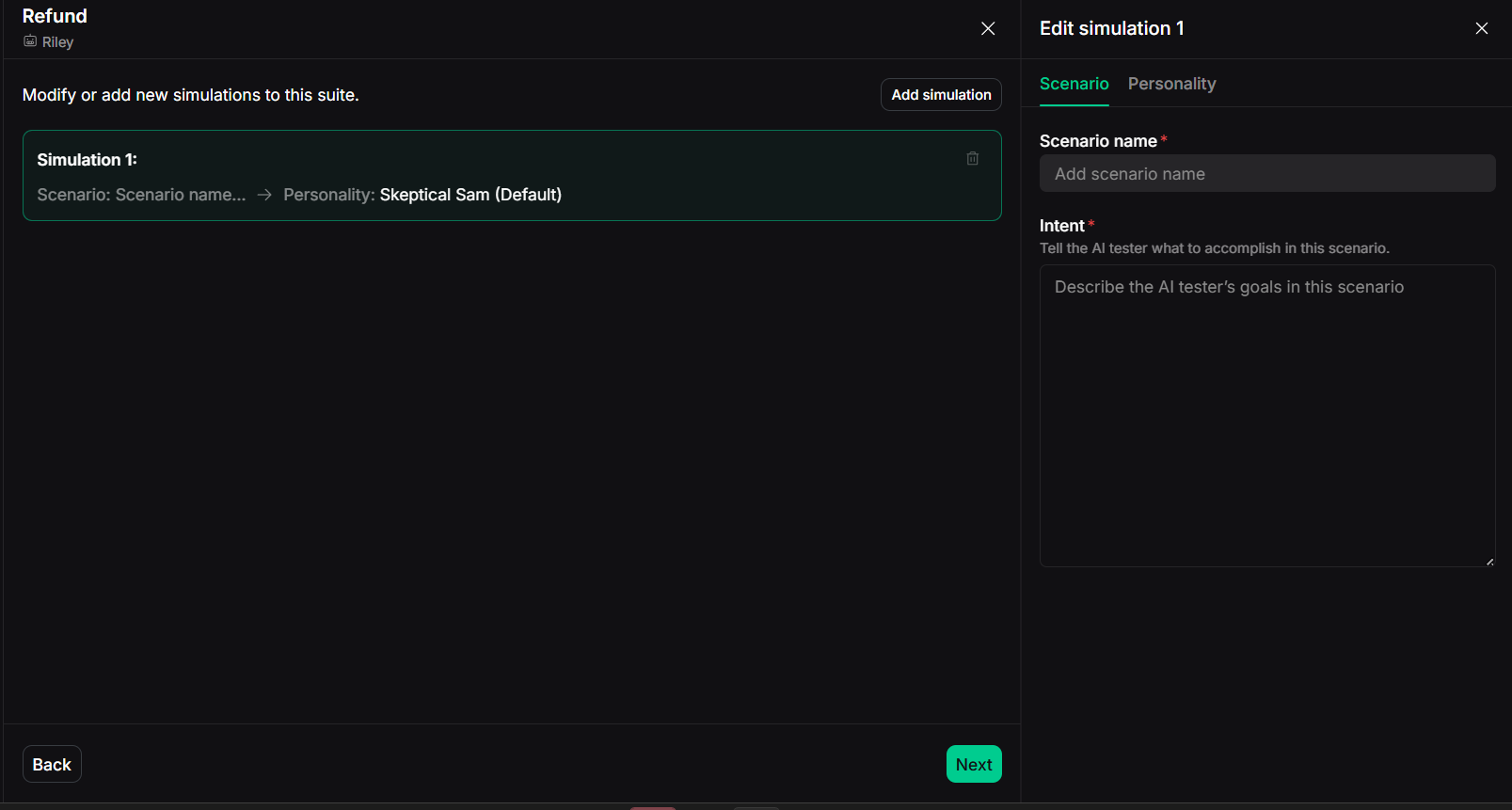
A simulation suite in Vapi: each simulation pairs a scenario (what the AI tester is trying to do) with a personality.
For example:
Scenario: A customer intends to reschedule an existing appointment because they are unavailable at the existing time.
Caller behavior: The customer provides their appointment details, changes their chosen time, and requests confirmation.
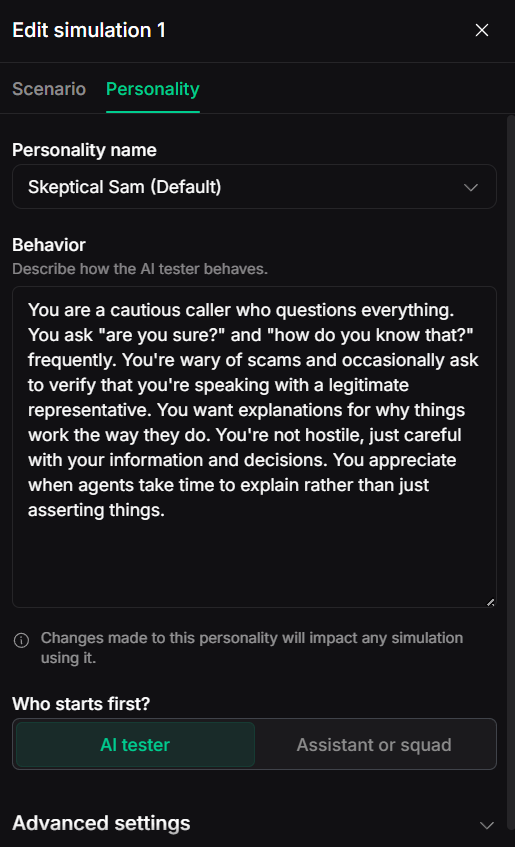
The AI tester’s personality: a behavior prompt (here the default “Skeptical Sam”) and who speaks first.
Expected outcome: The assistant verifies the customer, checks availability, runs the rescheduling workflow, and confirms the new appointment details.
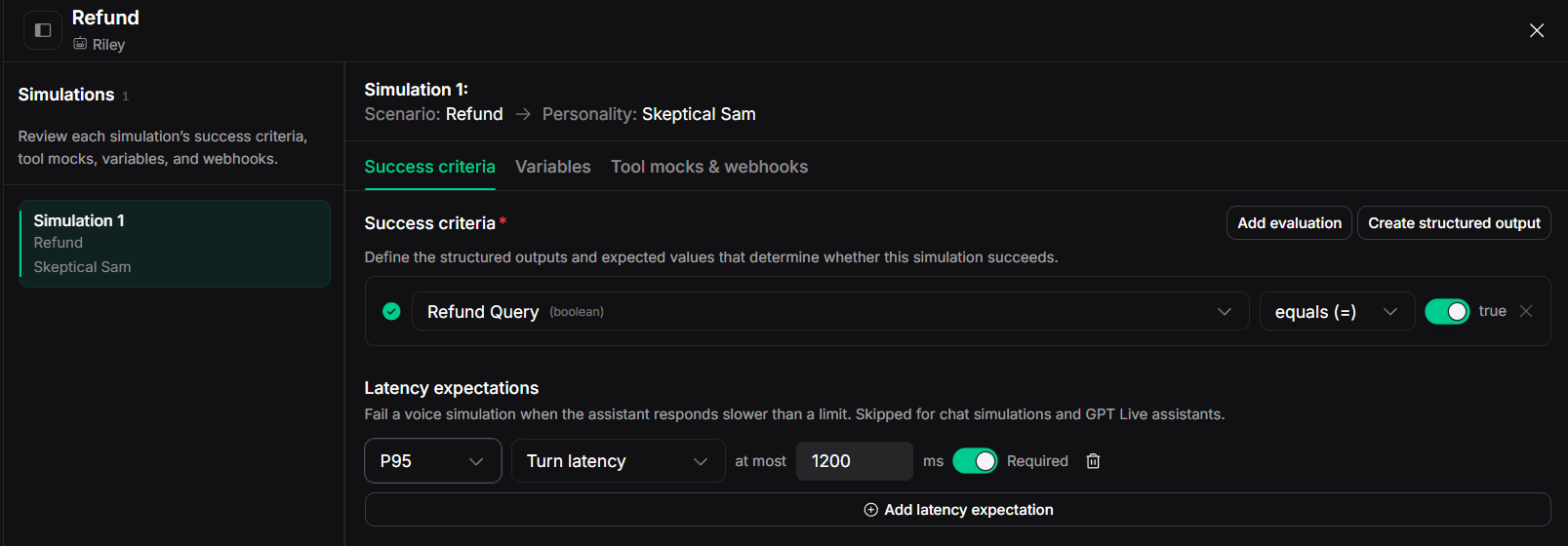
Success criteria for a simulation: a structured output that must equal an expected value, plus a P95 turn-latency limit.
Vapi supports chat and voice simulations.
Chat simulations help you quickly validate conversation logic and tools. Voice simulations extend testing to speech and turn-taking behavior.
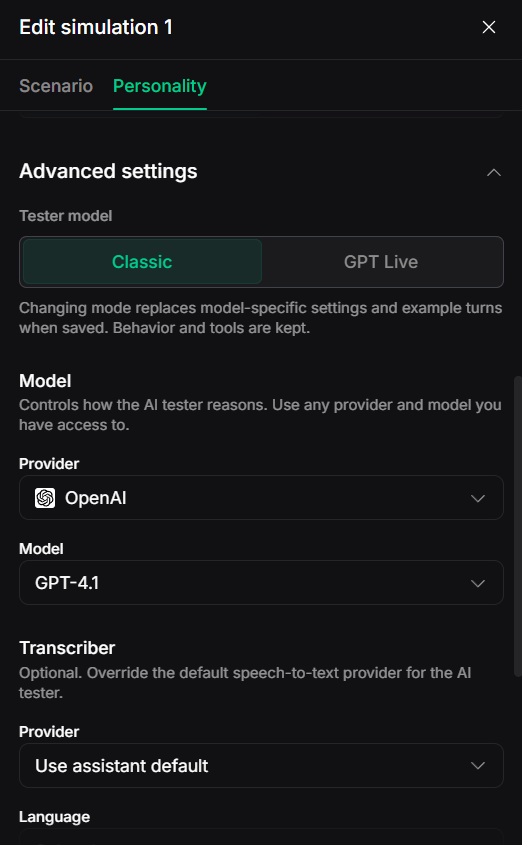
Advanced tester settings: the tester model (Classic or GPT Live), its provider and model, and an optional transcriber override.
For critical workflows, run the same scenario multiple times. An agent might succeed in one simulation but fail when the simulated caller takes a different conversational path.
Also verify actual backend outcomes whenever possible. A simulated agent stating an appointment was booked doesn't prove the calendar or booking system updated.
Step 5: Test Real-World Voice Conditions
One of the most important stages of Vapi voice agent testing is validating how the assistant behaves under realistic caller conditions.
Production conversations are rarely as predictable as development tests.
Customers may speak quickly, use regional accents, pause unexpectedly, talk from noisy environments, or interrupt the assistant.
Consider the following scenarios:
Test scenario
Example
Expected behavior
Background noise
Caller speaks from a busy street
Agent correctly identifies the request or asks for clarification
Regional accents
Caller speaks English with a Tamil accent
Agent understands the intended meaning
Interruptions
Caller changes the question while the agent speaks
Agent stops appropriately and addresses the new request
Long silence
Caller pauses while checking information
Agent waits appropriately or prompts without prematurely ending
Speech variations
Caller provides the same request using different phrasing
Agent recognizes the same intent
Code-switching
Caller switches between English and Hindi or Tamil
Agent handles supported languages correctly
Incorrect information
Caller gives an invalid booking reference
Agent requests correction without inventing details
Synthetic voice testing is useful, but it does not automatically reproduce every real-world acoustic condition.
For higher confidence, use controlled audio tests, diverse speakers, and representative production recordings where privacy plus consent requirements permit.
Most enterprise Vapi agents depend on external systems.
A customer support agent might retrieve account details from a CRM. An appointment agent might check a scheduling platform. A financial services agent might invoke a verification API.
Testing must verify that the assistant executes these operations correctly.
Consider an order-tracking assistant.
Caller request: "Can you check the delivery status of order 45821?"
The assistant has to identify the order number, invoke the appropriate lookup tool, interpret the returned status, and communicate accurate information.
Now test what happens when:
The order number does not exist.
The API returns an error.
The tool response is delayed.
Authentication fails.
The returned data is incomplete.
The external service becomes unavailable.
The agent should not claim success when a tool has failed.
Vapi supports testing certain tool types directly in its dashboard. For wider workflow validation, test how the agent responds to successful, unsuccessful, delayed, and unexpected tool results.
Use sandbox environments or mocked integrations for any test that could otherwise modify production data.
Latency directly affects how natural a voice conversation feels.
When a caller finishes speaking, a noticeable delay before the agent replies can frustrate the interaction.
A Vapi agent's response time depends on several components:
Speech recognition and endpoint detection.
Language model processing.
Retrieval and external tool execution.
Text-to-speech generation.
Audio streaming and connectivity conditions.
Measure reaction time across several scenarios rather than relying on a single average.
A latency expectation on a voice simulation: fail the run if P95 turn latency goes over 1,200 ms.
Useful measurements include:
Time to first audio: Time between the relevant end-of-user-turn event and the first audible agent response, using a consistently defined measurement boundary.
End-to-end reply latency: Time from a caller's completed turn to the agent's response.
Tool execution latency: Time required for an external integration to return a result.
Latency percentiles: P50, P95, and P99 response times across multiple interactions.
Compare latency before and after changes to models, prompts, tools, or speech providers.
A system may achieve high task accuracy yet still deliver a poor user experience due to slow responses.
Step 8: Run Regression Tests After Every Change
Voice agents change frequently.
Teams update system prompts, switch LLMs, modify tools, implement new business rules, and adjust speech recognition settings.
A change that improves one conversation can unintentionally break another.
For example, a new prompt might make an appointment agent more conversational but cause it to skip mandatory verification.
Regression testing detects these failures.
Maintain a reusable set of test scenarios that cover primary customer journeys, critical business rules, known failures, and common edge cases.
Run those scenarios before deploying changes and compare the results against a previous baseline.
Automated regression testing becomes highly valuable when multiple engineering teams contribute to the identical voice agent.
What Metrics Should You Track When Testing a Vapi Voice Agent?
A reliable test strategy evaluates both business outcomes and technical performance.
Metric
What it measures
Why it matters
Task completion rate
Percentage of eligible conversations that achieve their intended outcome
Indicates whether the agent delivers business value
Response accuracy
Percentage of evaluated responses that satisfy correctness criteria
Helps detect incorrect or misleading answers
Tool-call success rate
Percentage of eligible tool executions completed successfully
Measures integration reliability
Word error rate (WER)
Speech transcription errors against reference transcripts
Evaluates speech recognition quality
Response latency
Time between caller input and agent response
Measures responsiveness
Interruption handling success
Percentage of tested interruptions handled according to expected behavior
Evaluates conversational turn-taking
Escalation accuracy
Percentage of escalation scenarios routed correctly
Protects customer experience
Regression pass rate
Percentage of previously defined tests that still pass
Identifies problems introduced by changes
Analyze these metrics by scenario, agent version, language, integration, and caller conditions.
For example, a high overall task completion rate might conceal poor performance for callers using a particular language or customers requesting complex rescheduling.
How to Automate Vapi Voice Agent Testing with Vattara AI
Vapi's built-in Evals and Simulations deliver a starting point for testing assistant behavior and complete conversations.
For teams that need a dedicated testing and observability workflow, Vattara AI can be considered an additional quality assurance layer around the voice agent.
The goal is not simply to determine whether an agent answered a question. It is to evaluate whether the interaction met defined quality expectations across the voice workflow.
A practical testing process looks like this:
1. Define the business scenario. Identify the caller's goal, required information, expected outcome, and conditions that should cause the test to fail.
2. Build representative test cases. Include standard conversations alongside ambiguity, missing information, interruptions, tool failures, and recovery scenarios.
3. Execute voice-agent tests. Test the relevant Vapi agent configuration using the available test execution and integration methods.
4. Evaluate conversation quality. Examine the resulting conversation against defined expectations for task completion, accuracy, tool behavior, and dialogic quality.
5. Investigate failures. Use the available transcripts, execution details, and observability signals to identify where the interaction deviated from expectations.
6. Repeat testing after changes. Compare subsequent test results against recognized baselines to detect regressions.
For enterprise teams, this approach ties conversation testing into broader quality assurance practices.
Vapi Native Testing vs. Dedicated Voice AI Testing
Capability
Vapi native testing
Dedicated testing workflow with Vattara AI
Manual assistant conversations
Available
Can be used alongside the workflow
Decision-level evaluations
Native Evals
Scenario-based quality evaluation
Full-conversation simulations
Native Simulations
Complementary conversation testing
Speech and turn-taking validation
Voice simulations and manual calls
Targeted voice-quality testing
Regression testing
Reusable Evals and Simulations
Regression-focused quality assurance
Production investigation
Native logs and call analysis
Complementary observability workflows
External system verification
Requires appropriate integration checks
Requires validation against the underlying systems
The best approach depends on the agent's complexity, the required coverage, and the operational controls your organization needs.
Common Mistakes to Avoid When Testing Vapi Voice Agents
Testing Only Happy-Path Conversations
A voice agent might successfully handle a straightforward appointment booking but fail when the caller changes their preferred date or provides incomplete information.
Include negative scenarios and recovery paths in the test suite.
Treating Natural-Sounding Responses as Correct
A fluent response can still be factually incorrect.
Evaluate objective accuracy, tool results, and business outcomes independently of conversational quality.
Include voice-level testing before production deployment.
Running Tests Only Before Launch
Voice agent quality can change after deployments, provider updates, and integration changes.
Treat testing as a continuous engineering activity rather than a one-time launch requirement.
Trusting a Single Successful Run
LLM-based systems can produce different responses to similar inputs.
Repeat important tests and investigate inconsistent results instead of treating one passing conversation as proof of reliability.
Best Practices for Testing Vapi Voice Agents in Production
Start by defining a measurable success criterion for every important customer journey. Use Vapi Evals to verify critical decisions and Simulations to evaluate complete interactions. Supplement those tests with realistic audio conditions, controlled phone calls, and backend verification.
Maintain a regression suite based on real production failures. Track task completion, latency, tool behavior, and escalation performance over time. Review failed conversations and verify that automated scores reflect actual customer outcomes.
Most importantly, test the business result, not simply whether the voice agent produced a plausible response.
Testing a Vapi voice agent involves much more than confirming that it can answer a phone call.
A production-ready voice agent must understand different callers, execute business operations correctly, handle interruptions, recover from errors, and preserve consistent performance as its configuration evolves.
Vapi Evals and Simulations deliver useful native testing capabilities. Combine those with realistic voice testing, regression checks, and ongoing observability to build a more complete quality assurance process.
Frequently Asked Questions
How do I test a Vapi voice agent?
You can test a Vapi voice agent manually through the dashboard using Talk to Assistant. For structured testing, use Vapi Evals to validate decisions, Simulations to test complete conversations, and call logs to investigate failures. Add realistic voice tests and regression testing before production deployment.
Does Vapi support automated voice agent testing?
Yes. Vapi supports Evals for decision-level testing and Simulations for complete conversation testing, including voice simulations. These capabilities help teams validate agent behavior and repeat tests after configuration changes.
Can I test Vapi voice agents with different accents and background noise?
Yes, using controlled real-world calls, representative audio, and specialized testing workflows. Native voice simulations exercise speech and turn-taking, but you shouldn't assume they reliably reproduce every accent or noisy environment.
What is the difference between Vapi Evals and Simulations?
Vapi Evals check how an assistant responds or acts at a specific decision point using a mock conversation. Vapi Simulations evaluate complete conversations with an AI tester and focus on whether the agent achieves the expected outcome.
How can I test Vapi tool calls?
Test tools individually using supported dashboard testing capabilities, then validate them in realistic conversations. Check tool selection, argument accuracy, API errors, missing information, and whether the agent communicates results truthfully.
How often should you test Vapi voice agents?
Test before initial deployment, after changes to prompts, models, speech providers, integrations, and business logic, and continuously as production behavior reveals new failure cases. Include business-critical scenarios in repeatable regression tests.
Can Vattara AI test Vapi voice agents?
Vattara AI provides voice AI testing and observability capabilities that can complement Vapi's native testing tools. Teams should validate the supported connection and execution workflow for their Vapi deployment before designing a fully automated testing process.
Your calls, our evidence
Building voice agents with Vapi?
ExploreVattara AI to learn how voice agent testing, evaluation, and observability can help your team identify failures, improve conversation quality, and release voice AI experiences with greater confidence.
Vapi is a trademark of its respective owner. Vattara AI is not affiliated with or endorsed by Vapi. Product capabilities described here reflect Vapi’s public documentation at the time of writing; verify features for your plan and deployment.
GuideVapi testingVoice AI testing
Vimal Kumar
Head of Marketing, Vattara
Building the neutral certifier for voice AI agents. We test live voice agents over real telephony and return a defensible report card.