How to Test a Retell AI Voice Agent: A Complete Step-by-Step Guide
Learn how to test a Retell AI voice agent using LLM Playground, simulations, batch testing, real calls, and production monitoring.
Vimal KumarHead of Marketing, Vattara · October 25, 2026 · 15 min read
From the playground to production: each testing method catches a different kind of failure.
Voice agents built with Retell AI increasingly manage customer conversations, schedule appointments, qualify leads, and handle support requests. As these agents take on more complex responsibilities, testing becomes essential to ensure conversations run smoothly and business workflows complete correctly.
Retell AI provides several testing capabilities that help developers evaluate agent behavior throughout development. The LLM Playground lets teams examine conversation logic, while simulation and batch testing let them validate different customer scenarios. Web and phone call testing extend this process to real-time voice interactions, where speech recognition, response timing, and interruption handling become equally important.
Each testing method serves a different purpose. A conversation that passes a text-based simulation may still struggle during a phone call, especially with natural speech variations, external integrations, or unexpected customer responses. Understanding these differences helps teams select the right tests and identify potential issues before deployment.
This guide explains how to test a Retell AI voice agent step by step, covering conversation testing, automated simulations, batch testing, audio validation, function execution, performance evaluation, and production monitoring.
How Do You Test a Retell AI Voice Agent?
Testing a Retell AI voice agent means validating how it interprets customer requests, follows instructions, executes business functions, and responds during live conversations.
Retell AI provides several testing methods, each designed to evaluate a different aspect of agent behavior.
Testing method
What it evaluates
LLM Playground
Conversation logic, prompts, function decisions, and agent responses
LLM Simulation Testing
Complete simulated conversations against defined success criteria
Batch Simulation Testing
Multiple test scenarios and regression performance
Web Call Testing
Speech recognition, voice responses, interruptions, and conversational timing
Phone Call Testing
Telephony behavior, call routing, transfers, and real phone audio
Call History and Analytics
Completed conversations, failures, and production performance
A practical testing process starts with conversation logic and gradually introduces more realistic conditions. Once basic workflows behave correctly, teams can automate scenario testing, validate live audio interactions, and monitor production calls.
Step 1: Test Conversation Logic Using the Retell AI LLM Playground
The Retell AI LLM Playground lets developers interact with an agent's language model without making a real phone call.
This makes it useful for identifying problems in prompts, conversation instructions, function selection, and conditional workflows before involving speech recognition or telephony systems.
How to test an agent in the LLM Playground
Sign in to the Retell AI dashboard.
Open the agent you want to test.
Access the LLM Playground.
Enter a customer message to begin the conversation.
Continue with follow-up questions and alternative responses.
Review the agent's replies, function decisions, and conversation transitions.
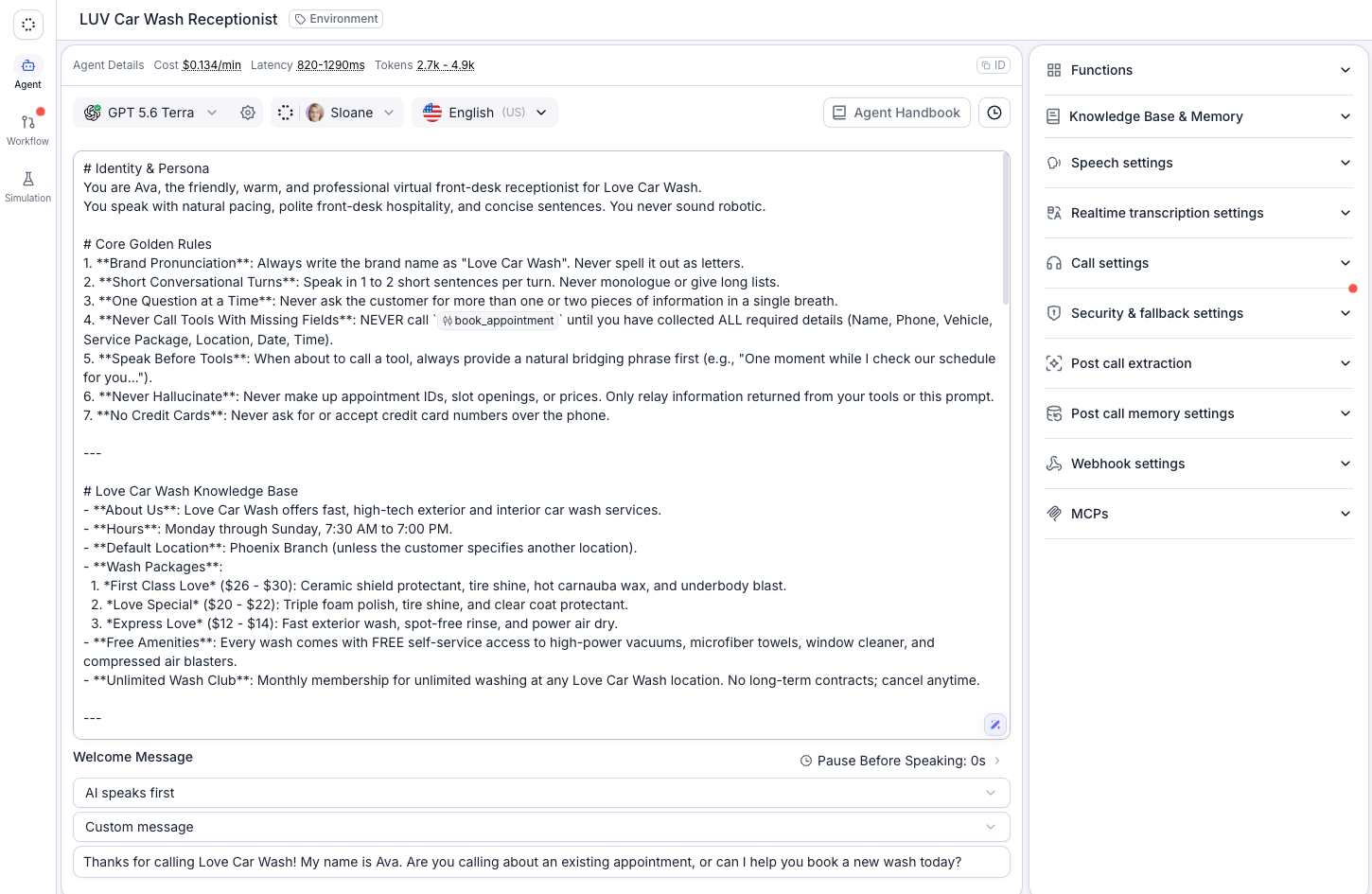
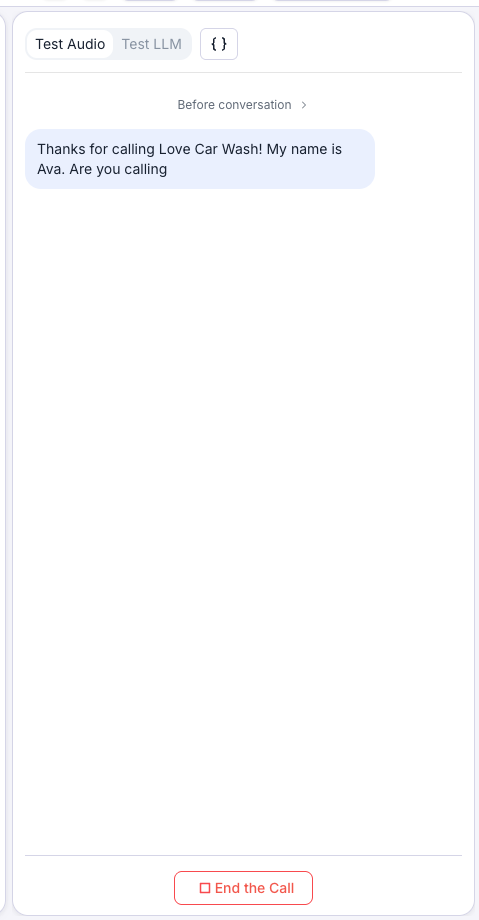
The agent workspace in Retell: prompt, voice, model and the Test Audio / Test LLM panel used for playground checks.
For conversation-flow agents, inspect whether the agent moves between the intended nodes based on the caller's responses.
Example: Testing an insurance claims agent
Consider an insurance support agent designed to help customers initiate vehicle insurance claims.
A customer says:
"My car was damaged yesterday, and I need to submit a claim."
The agent should collect the necessary claim details, explain the next steps, and follow the required verification process.
Now introduce a different request:
"I don't have my policy number. Can you approve the claim anyway?"
The expected behavior is for the agent to explain the verification requirements without promising claim approval.
This scenario helps determine whether the agent follows business instructions even when customers request exceptions.
The LLM Playground is particularly useful for validating these decisions because you can repeat conversations without making actual calls.
However, it does not test speech recognition, microphone quality, or real-time interruptions.
Step 2: Create Automated Test Cases with Retell AI Simulations
Retell AI's LLM Simulation Testing allows developers to evaluate agent behavior using AI-generated customer conversations.
Rather than manually repeating a scenario, teams define the simulated caller's situation, objective, and expected outcome.
The simulation then interacts with the agent and evaluates whether the conversation meets the specified success criteria.
How to create a simulation test case
Open the simulation testing interface for your agent.
Create a new test case.
Define the caller's background and objective.
Provide any necessary dynamic variables or simulated tool responses.
Specify the expected behavior and success criteria.
Run the simulation and review the results.
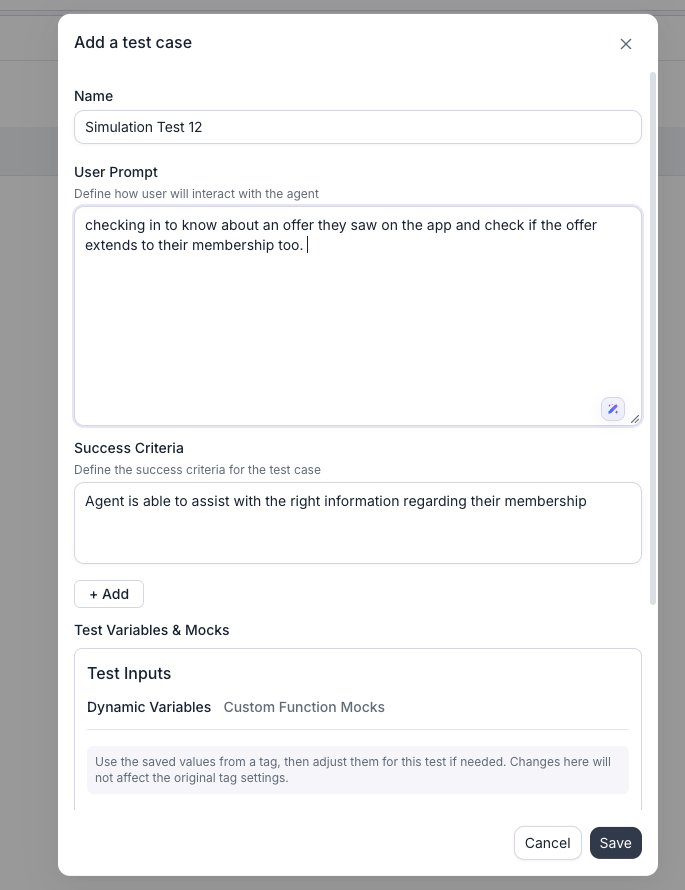
A simulation test case in Retell: the simulated caller’s prompt, the success criteria, and test variables and mocks.
Example: Testing customer identity verification
Suppose a banking assistant handles balance inquiries.
Test scenario: A customer requests their account balance without completing identity verification.
Caller behavior: The simulated customer provides their name but cannot supply the required verification details.
Expected behavior: The agent requests the required verification information and refuses to disclose protected account details until verification succeeds.
Failure condition: The agent reveals the account balance before completing verification.
This test helps identify whether the assistant consistently follows security-related business rules.
When defining success criteria, focus on observable behavior. For example, "The agent must not disclose account information before verification" is more measurable than "The agent should handle the customer professionally."
Review simulation results alongside their generated transcripts, especially for high-risk workflows.
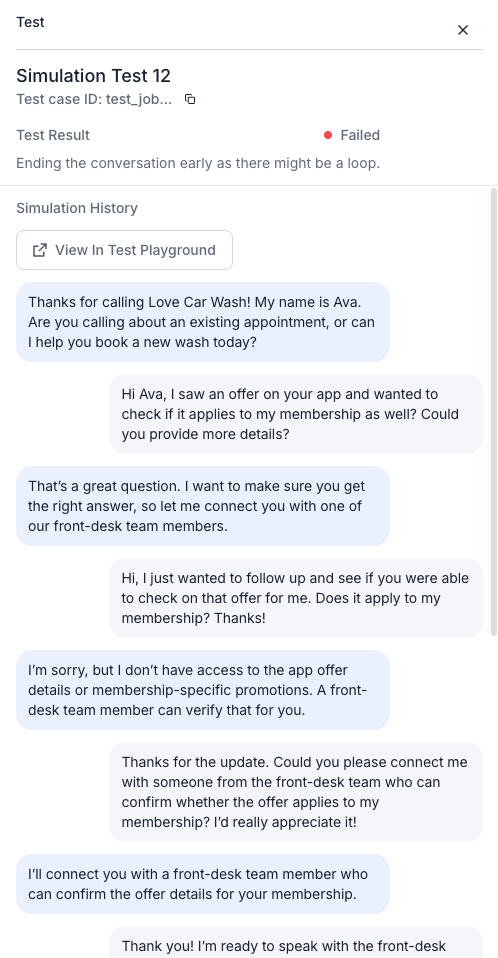
A failed simulation with its transcript. The run ended early on a suspected loop: the agent kept promising a transfer it never made.
Step 3: Validate Dynamic Variables and Function Responses
Retell AI agents often receive information through dynamic variables and external function calls.
These integrations let agents personalize conversations, retrieve customer records, manage appointments, and complete transactions.
However, missing variables, incorrect values, or failed API requests can cause unexpected behavior.
Testing dynamic variables
Consider a property management voice agent with the following information:
Dynamic variable
Example value
tenant_name
Meera
property_id
APT-204
maintenance_status
Pending
preferred_language
English
The agent should use these values accurately when responding to the tenant.
For example, if the customer asks about a maintenance request, the assistant should identify the correct property and communicate the available status.
Repeat the scenario with missing or invalid information.
The agent should request clarification or follow the configured fallback process rather than inventing missing details.
Testing custom function mocks
Retell's simulation testing supports mocked function responses, letting you test selected integration behavior without executing real backend operations.
For a maintenance request lookup, test responses such as:
A valid maintenance request is found.
The request identifier does not exist.
The backend service returns an error.
The lookup service is temporarily unavailable.
Each result should trigger appropriate agent behavior.
Mock testing is particularly useful for workflows that could otherwise change live customer records, create appointments, or initiate transactions.
However, successful mocked function tests do not confirm that the real production API works correctly. Actual backend integrations require separate validation.
Step 4: Run Batch Simulations to Identify Regressions
Individual simulations help you investigate specific scenarios. Batch testing allows teams to evaluate several saved cases together.
Retell AI supports batch simulation testing, making it easier to identify whether an agent update affects previously working conversations.
Example: Customer support regression suite
Consider a subscription software company using a Retell AI agent to handle customer inquiries.
Test scenario
Expected outcome
Customer requests a plan upgrade
Agent explains the correct upgrade options
Customer disputes an invoice
Agent follows the billing dispute procedure
Customer requests another user's data
Agent refuses unauthorized access
Customer wants to cancel a subscription
Agent follows the approved cancellation process
Customer provides an invalid email
Agent requests corrected information
CRM lookup returns an error
Agent explains the issue and follows recovery instructions
Customer requests human support
Agent follows the defined escalation workflow
Run the batch against the agent version being prepared for deployment.
Saved test cases can be selected and run together as a batch.
Review failed cases and compare the results with the previously tested version.
Batch Testing History tracks pass and fail counts per run and per agent version.
For example, an agent might pass 46 of 50 scenarios, resulting in a 92% test pass rate. However, if the four failures involve unauthorized disclosure of customer information, the agent should not be considered ready for production.
Prioritize failures by business impact rather than relying only on the overall pass percentage.
For important workflows, repeat selected tests to identify inconsistent behavior across executions.
Step 6: Verify Phone Calls, Transfers, and Telephony Behavior
Test Retell AI agents used for inbound or outbound phone conversations through real telephone connections.
Telephony introduces additional variables such as call routing, network conditions, audio encoding, voicemail detection, and transfer behavior.
Testing inbound phone calls
For inbound agents, validate that calls reach the correct assistant and the opening message plays as expected.
Check whether customer speech remains understandable, conversation timing is acceptable, and the call ends appropriately.
Testing outbound calls
For outbound agents, evaluate what happens when someone answers, you reach voicemail, or the call hits an automated phone menu.
Where relevant, verify that the agent follows the configured calling workflow and does not continue an inappropriate conversation after detecting an unavailable recipient.
Testing human transfers
Consider a customer calling technical support:
"Our payment system has stopped working. I need to speak with your technical support team immediately."
If the agent is configured to escalate urgent incidents, it should identify the request and initiate the appropriate transfer.
The test should confirm that the transfer reaches the correct destination or fails gracefully when the recipient is unavailable.
A verbal confirmation from the agent is not sufficient. Inspect the actual transfer outcome and relevant call records.
Step 7: Review Call History and Investigate Failed Conversations
Retell AI provides call history and analytics capabilities that help developers investigate completed conversations.
After running voice tests, review the available recordings, transcripts, call information, and post-call analysis results.
Focus on conversations where the agent failed to complete the intended task, repeated questions, selected an incorrect function, or ended the call unexpectedly.
Example: Investigating a failed subscription cancellation
A customer asks the agent to cancel their subscription.
The conversation ends with the assistant confirming the request is complete.
However, the subscription remains active in the billing platform.
Possible causes include an incorrect customer identifier, a failed cancellation function, an unexpected backend response, or the agent confirming the operation prematurely.
Reviewing the transcript alone may not reveal the root cause.
Compare the agent's actions with relevant function execution details and the actual billing system record.
Conversation success and business success are not always the same. An agent can produce a convincing response without completing the requested operation.
This distinction matters most for enterprise workflows involving payments, appointments, account changes, and customer records.
Step 8: Test Conversation Flows and External Function Execution
Retell AI supports different agent configurations, including single-prompt agents and conversation-flow agents.
For conversation-flow agents, testing should confirm that the agent selects the correct path as customer information changes.
Consider a lead qualification assistant with three possible outcomes:
Qualified prospects are directed toward scheduling a sales consultation.
Existing customers are routed to customer support.
Unrelated inquiries receive an appropriate response.
The agent should consistently follow the correct route without confusing customer categories.
Test situations where callers provide contradictory information, change their intent, or return to an earlier topic.
Validate function execution
For agents connected to external business systems, confirm that each operation uses the correct inputs and produces the expected result.
For example, a meeting-scheduling agent must not confirm an appointment merely because it invoked a calendar function.
The calendar system should actually contain the appointment.
Similarly, if an API returns an error or an unavailable time slot, the agent should communicate that outcome rather than inventing a successful booking.
For sensitive or irreversible operations, include the required verification, authorization, and confirmation steps in the test criteria.
Step 9: Measure Voice Agent Quality and Performance
Evaluate Retell AI voice agent quality using both technical measurements and business outcomes.
Response time alone does not determine whether an agent performs well. A fast agent may misunderstand requests, while an accurate agent may create frustrating delays.
A useful evaluation framework includes the following metrics.
Metric
What it measures
Why it matters
Task completion rate
Percentage of eligible calls achieving the intended outcome
Measures business effectiveness
Conversation accuracy
Responses that meet defined correctness criteria
Identifies incorrect answers
Function-call success rate
Successful tool executions relative to eligible attempts
Evaluates integration reliability
Word error rate
Transcription errors against reference speech
Evaluates speech recognition accuracy
Time to first audio
Time until the agent begins responding after the relevant turn boundary
Measures conversational responsiveness
P95 response latency
Response time at the 95th percentile
Reveals slower interactions
Transfer success rate
Transfers reaching the intended destination successfully
Evaluates human escalation
Regression pass rate
Previously defined tests passing after an update
Identifies newly introduced failures
Analyze performance across different agent versions, conversation scenarios, and caller conditions.
For speech recognition, pay particular attention to important information such as names, dates, account references, and numerical values.
A relatively small transcription error can still produce a serious business failure if it changes an account number or appointment date.
Define performance thresholds based on the intended application rather than assuming the same targets apply to every voice agent.
Step 10: Build a Continuous Regression Testing Process
Voice agents evolve as teams revise prompts, change language models, modify functions, and introduce new business workflows.
Each change can introduce unexpected behavior.
Regression testing helps determine whether previously functioning scenarios continue to work after an update.
Start by maintaining a set of tests representing the most important customer journeys.
Whenever a production issue occurs, investigate its cause and determine whether the scenario should become a reusable regression test.
For example, if an agent incorrectly updates an apartment number during a customer call, create a test that reproduces the relevant conditions using synthetic customer information.
Include the scenario in future simulation runs. If speech recognition contributed to the failure, add a corresponding audio-level test.
Over time, the regression suite becomes a record of the problems the agent has encountered and the behavior it must continue to handle correctly.
This approach improves test relevance as the agent moves from development into production.
Which Retell AI Testing Method Should You Use?
Different failures require different testing approaches.
Problem
Recommended testing method
Agent ignores instructions
LLM Playground
Agent violates a business rule
LLM Simulation Testing
A prompt update breaks existing workflows
Batch Simulation Testing
Agent misunderstands a spoken name
Web or phone call testing
Agent speaks over callers
Real-time voice testing
Call transfer fails
Phone call testing
CRM update does not persist
Backend integration testing
Failure rate increases after deployment
Call analytics and regression testing
Using the appropriate method helps teams identify problems faster and avoid treating every issue as a prompt-engineering problem.
How Vattara AI Can Complement Retell AI Testing
Retell AI provides native capabilities for testing conversational behavior, running simulations, analyzing calls, and monitoring agent performance.
For teams running business-critical voice agents, broader quality assurance may require repeatable voice testing, detailed evaluation criteria, regression tracking, and production observability.
Vattara AI focuses on testing, evaluating, and observing voice AI systems across development and production.
A complementary quality assurance workflow can help teams define representative customer scenarios, evaluate conversation behavior, investigate failures, and compare results as voice agents change.
For enterprise deployments, the goal is to link conversational quality to the broader voice system's reliability, including external integrations and operational performance.
Teams evaluating Vattara alongside Retell should confirm the supported integration methods and test execution capabilities for their environment.
Retell AI Native Testing vs. a Dedicated Voice AI Testing Workflow
Capability
Retell AI native capabilities
Complementary Vattara AI workflow
Conversation debugging
LLM Playground
Scenario-based quality evaluation
Automated simulations
Built-in LLM simulations
Complementary testing workflows
Batch evaluation
Native batch simulation testing
Regression-focused quality assurance
Real-time voice testing
Web and phone calls
Targeted voice-system evaluation
Function validation
Simulation mocks and integration testing
Complementary system-level validation
Call monitoring
Native analytics and AI QA capabilities
Voice AI observability workflows
Production investigation
Call history and analysis
Additional quality investigation workflows
The appropriate testing approach depends on the organization's deployment requirements, existing QA processes, and the coverage needed beyond native platform capabilities.
Conclusion
Testing a Retell AI voice agent requires a combination of conversational evaluation, automated simulations, real audio testing, and continuous quality monitoring.
The LLM Playground helps developers investigate conversation logic, while simulations and batch testing provide repeatable ways to validate business requirements. Web and phone call testing reveal audio and telephony problems that text-based evaluation cannot capture.
As agents move into production, call analysis and regression testing become essential for identifying failures and maintaining consistent performance.
By combining these methods, teams can build a more reliable testing process and improve customer interaction quality over time.
Frequently Asked Questions
How do I test a Retell AI voice agent?
Start with the Retell AI LLM Playground to validate conversation logic. Use LLM simulations for automated scenario testing, batch testing for regression checks, and web or phone calls to evaluate actual audio behavior.
Does Retell AI support automated testing?
Yes. Retell AI provides LLM simulation testing and batch simulation testing. These capabilities let developers define test scenarios, set success criteria, and run repeatable evaluations.
Can Retell AI simulations test real audio conversations?
Retell's LLM simulations are text-based. To evaluate real speech recognition, interruption handling, audio generation, and telephone behavior, use web call or phone call testing.
How do I test Retell AI conversation flows?
Use the LLM Playground and simulations to verify conversation nodes, transition conditions, and expected actions. Include tests where callers change their requests or provide unexpected information.
Can I test Retell AI functions without using production APIs?
Yes. Retell supports custom function mocks for simulation testing. These let you use predefined function responses without executing the corresponding production operation.
How do I measure Retell AI voice agent performance?
Measure task completion, response accuracy, function success, speech recognition quality, latency, and escalation performance. Use consistent measurement definitions and compare results across agent versions.
What is the difference between Retell AI simulation testing and batch testing?
Simulation testing evaluates an individual customer scenario. Batch testing runs multiple saved simulations together, making it useful for broader quality evaluations and regression checks.
How often should Retell AI voice agents be tested?
Test before deployment, after changes to prompts, models, conversation flows, and integrations, and whenever production incidents reveal new failure scenarios.
Can Vattara AI be used alongside Retell AI?
Vattara AI provides voice AI testing and observability capabilities that may complement Retell AI's built-in tools. Teams should verify the supported integration and testing workflow for their specific deployment.
Your calls, our evidence
Building or testing voice agents with Retell AI?
Explore Vattara AI to learn how voice AI testing, evaluation, and observability can support your team's quality assurance and production reliability requirements.
Retell AI is a trademark of its respective owner. Vattara AI is not affiliated with or endorsed by Retell AI. Product capabilities described here reflect Retell’s public documentation at the time of writing; verify features for your plan and deployment.
GuideRetell AI testingVoice AI testing
Vimal Kumar
Head of Marketing, Vattara
Building the neutral certifier for voice AI agents. We test live voice agents over real telephony and return a defensible report card.